Enabling RS Drive 2 in a Megane MK3
On this page
I don’t know why, but some cars that have RS Monitor don’t have RS Drive 2 enabled, which basically allows you to change throttle response, traction control, and the power steering per mode (Normal, Sport and Race). This is a guide on how to enable that via DDT4ALL.
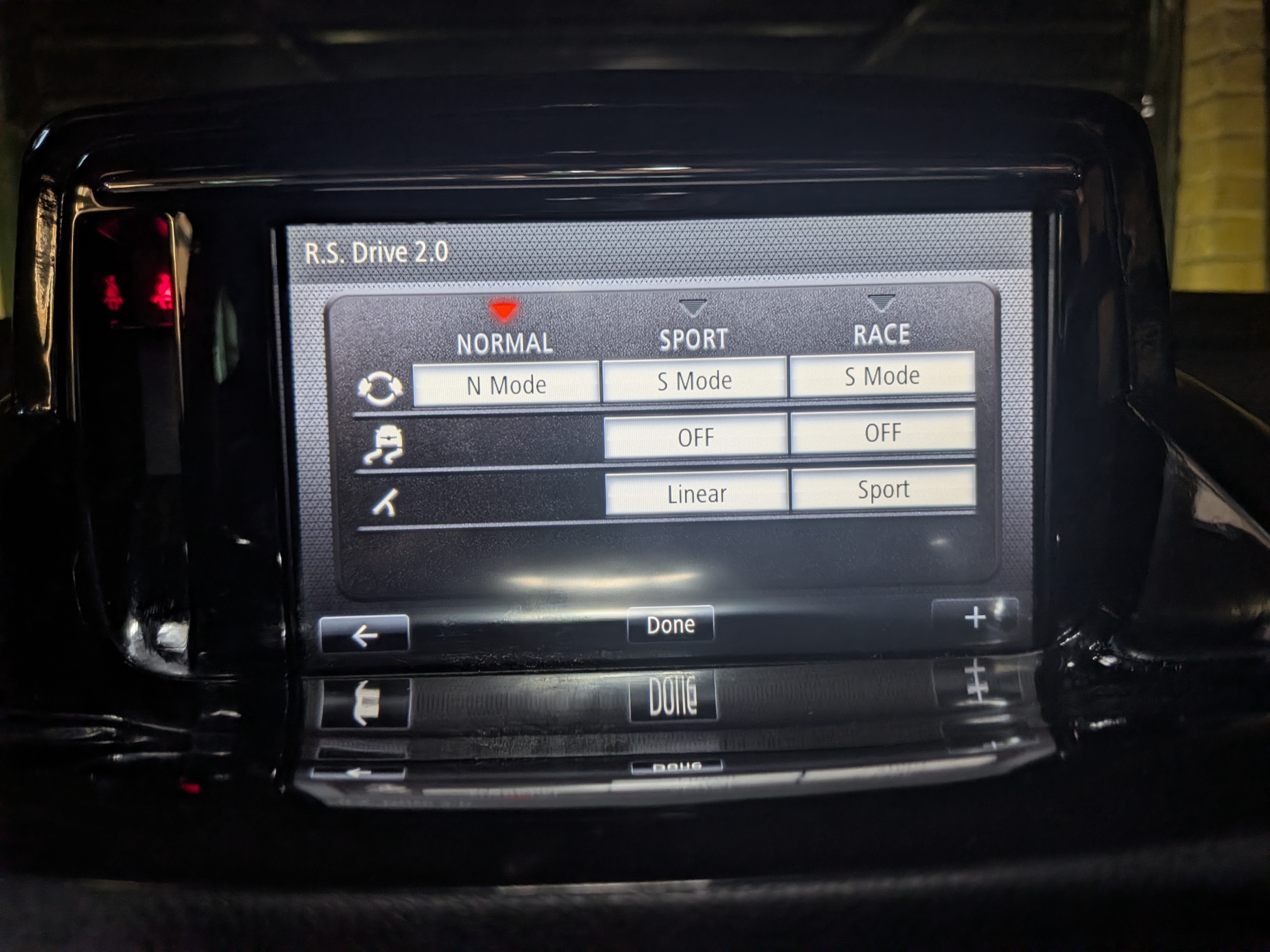
There aren’t any English guides on this so I thought I’d make one, it’s actually very easy to do.
What you’ll need
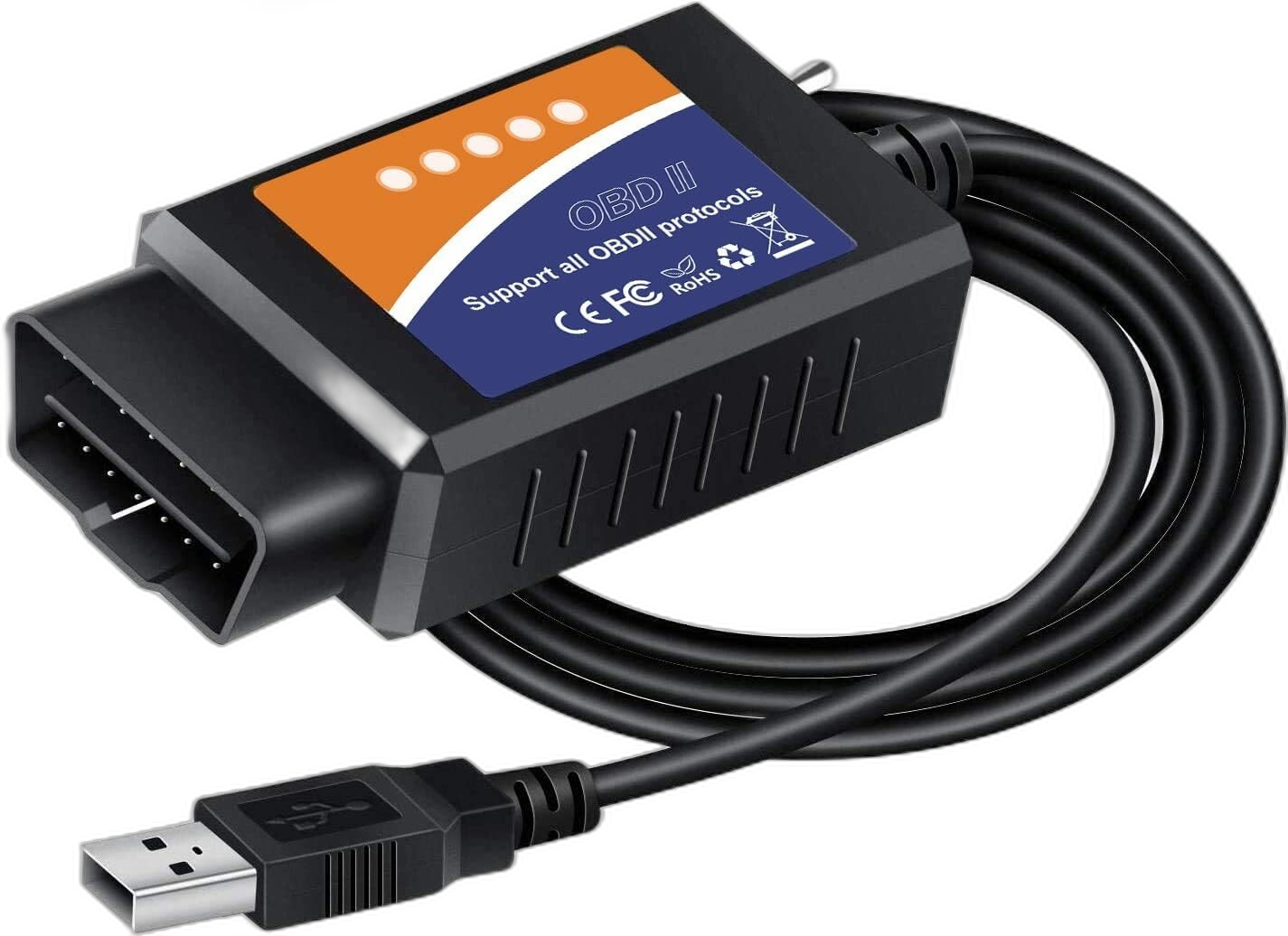
First you’ll need a modified ELM327 adapter like this one designed for Ford as they use the same pinout as Renault. For this to work you’ll need the driver which you can download here, just plug in the ELM and install the driver. Then you’ll need DDT4ALL, download the latest release for your system. At the time of writing this I was using 3.1.3. DDT4ALL doesn’t ship with database files, here’s database files from February 2021, just unzip and place all of the folders/files into the DDT4ALL install folder.
Connecting to the car
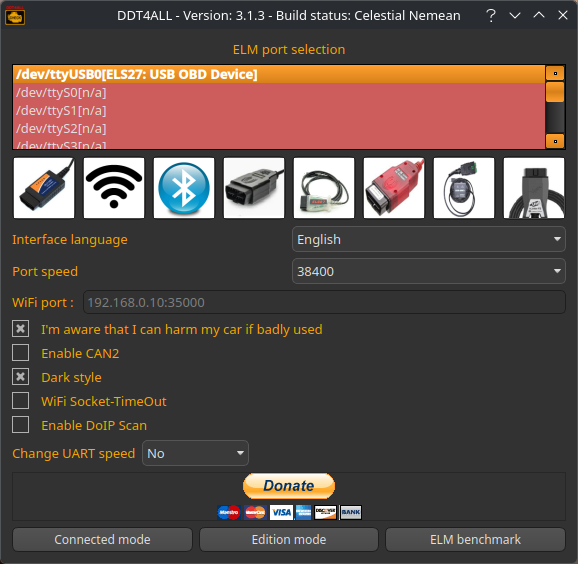
Once you have DDT4ALL setup we need to go over to the car and plug in the ELM adapter to the OBD port and the laptop. Make sure the ignition is on (just put the key in the slot) and then run DDT4ALL. Make sure you accept the disclaimer and then select Connected mode.
You’ll also need to make sure that the adapter is in the correct mode to communicate with the infotainment system rather than engine computer. On the adapter I linked above when it’s plugged in and the sticker is facing up, the metal switch should be in the down position. If for whatever reason the next steps don’t show the correct results just flip it and try again.
As below, select “[X95PH2] - Renault Megane III Ph2” from the dropdown, it will work without doing this however the next step will take a lot longer as it will search for every single ECU, not just the Megane III ones.
Then press scan button to the right of the drop down menu, it looks like a QR code with a magnifying glass next to it and wait, it should take a couple of minutes to scan.
Once the scan has finished you should see some ECUs appear in the Ecu window below, the one we’re looking for should be named “MFD v5.4” or something very similar.
Finding the RS Display settings
Once you click on “MFD v5.4” you’ll see some new options appear below in Screen window, expand “1 - Configuration”, then select “14 - ECU configuration - HMI.TMPS,RestrictionVIN,RS Display & Communication”. As seen below.
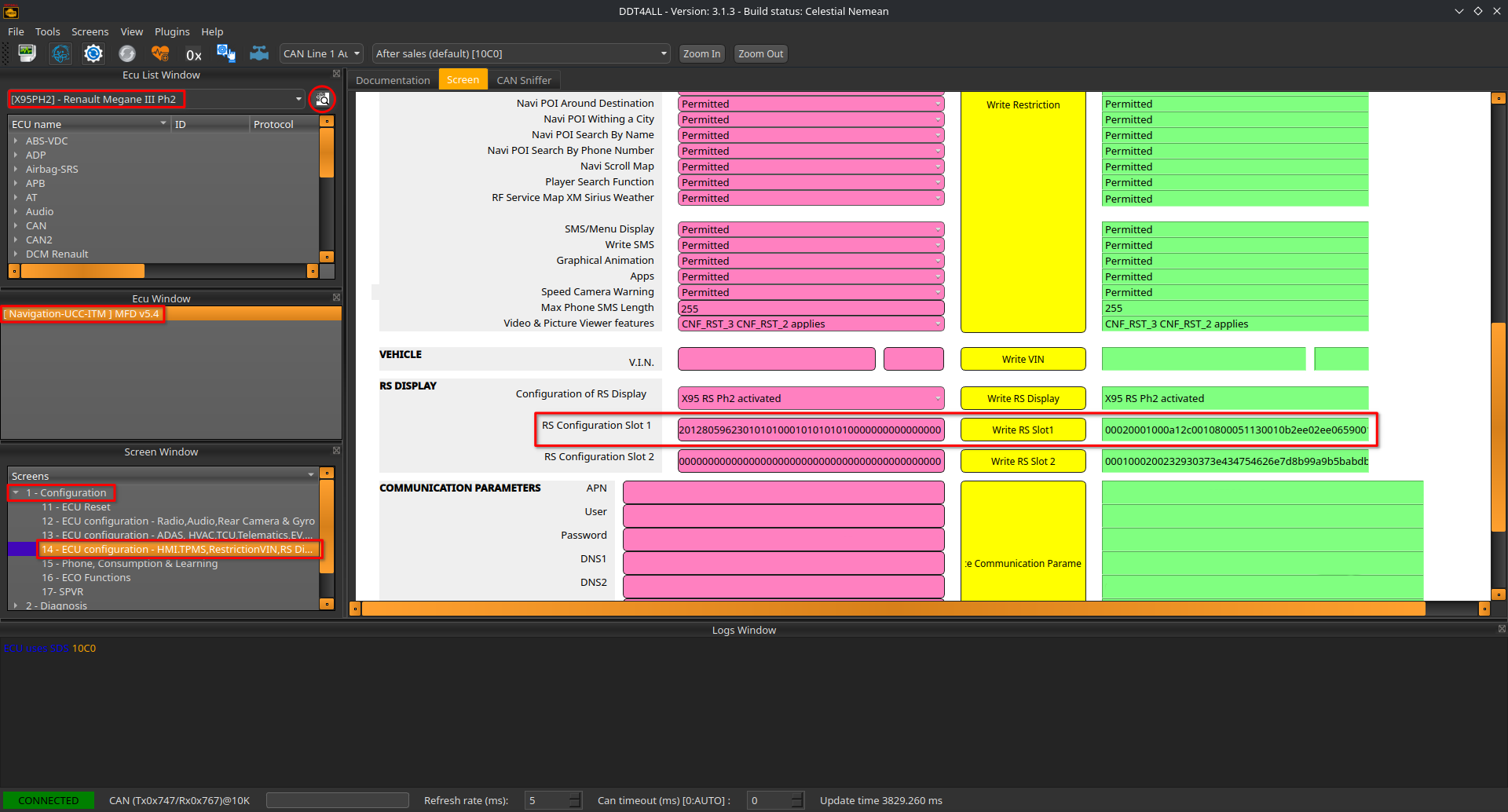
As you can see above the main window should contain a bunch of red, green and yellow boxes. Scroll down until we get to “RS DISPLAY” with 3 options below it. The one we are interested in is “RS Configuration Slot 1”. Slot 2 isn’t needed for what we’re doing.
Before we go any further I highly suggest you copy and save Slot 1 and 2 (even though we’re not touching 2, it’s good practice) somewhere safe just in case the edit goes wrong so you have your original figures. You copy from the red boxes on the left, it won’t let you copy from the right side.
On another note, if anyone follows this guide on a Megane 265, can you please comment your Slot 1 and 2 figures below as I’ve not come across those yet, and I’ll add them here.
Slot values
I’ll be using a Megane 275 slot as an example. Below is the original Megane 275 slot 1 with two modified ones (the first one just enables RS Drive, the second one enables RS Drive but also makes other readouts a lot more useful like coolant temp and oil temp, as it lowers the values needed to display them. For example normally oil doesn’t display until 50C, but with this it displays from 0C). I’ll also add slot 2 just in case anyone needs or wants it, but we don’t need it for this.
RS 275 Slot 1: 00020001000A0E10010800050ABE010B2EE02EE0659001075A5ABE010A3C3C7801042EE02EE032C801042EE02EE0345801076E6EA001050000190A0A2710271036B0010A5F5F91010A64646E010000000A010000008C01072EE032C884D0010B00010203040506070204000901000101010101000180808080757575726B6A686561605E615A58546154514B614F4B44614B463E614A443E614B443E614D443E614D443E618080808083838383858584818887877F8C8B897F908F8C7F97958F7F9E9B8F7FA8A28F7FB3A28F7FBAA28F7FBAA28F7F14506E013201280596230000000000000000000000000000000000
RS 275 Slot 1 RS Drive: 00020001000A0E10010800050ABE010B2EE02EE0659001075A5ABE010A3C3C7801042EE02EE032C801042EE02EE0345801076E6EA001050000190A0A2710271036B0010A5F5F91010A64646E010000000A010000008C01072EE032C884D0010B00010203040506070204000901000101010101000180808080757575726B6A686561605E615A58546154514B614F4B44614B463E614A443E614B443E614D443E614D443E618080808083838383858584818887877F8C8B897F908F8C7F97958F7F9E9B8F7FA8A28F7FB3A28F7FBAA28F7FBAA28F7F14506E013201280596230001010001010101000000000000000000
RS 275 Slot 1 RS Drive Improved: 00020001000a0fa0010800050c1c010b05e005e0699001072828be010a28289601042ee02ee032c801042ee02ee0355201072828aa010500001e0a0a2710271036b0010a2828c8010a64646e010000000a010000008c01072ee02ee0f230010b00010203040506070204000901000101010101010180808080757575726b6a686561605e615a58546154514b614f4b44614b463e614a443e614b443e614d443e614d443e618080808083838383858584818887877f8c8b897f908f8c7f97958f7f9e9b8f7fa8a28f7fb3a28f7fbaa28f7fbaa28f7f14506e013201280596230101010001010101000000000000000000
RS 275 Slot 2: 0001000200525F6F7F8F9AA3A7AAAAAAA8A7A6A5A3A2A19B958E867E644B323232525F6F7F8F9AB4B4B4B4B4B4B4B4B1B1AEAAA8A49A8A7A78645A503269019064057864004E2064635F6401903C03E864646464646464004B007700A800E6012201606464325A6E010696965A829600014502640FDC1C87B402000000000100015F880F010200030414100A0300284B6E96BE000000000000000000000000000000000000000000000000000000000000000000000000000000000000000000000000000000000000000000000000000000000000000000000000000000000000000000000000000000000000000000
If you look, only the last part of the slot is changed, this tells the car to enable RS Drive.
Writing the new slot
Make sure that these two buttons are pressed at the top of DDT4ALL, “Expert mode” and “Auto refresh”. Expert mode allows writing to the ECU, and auto refresh just reads the ECU automatically which makes it easier to know if your write worked.
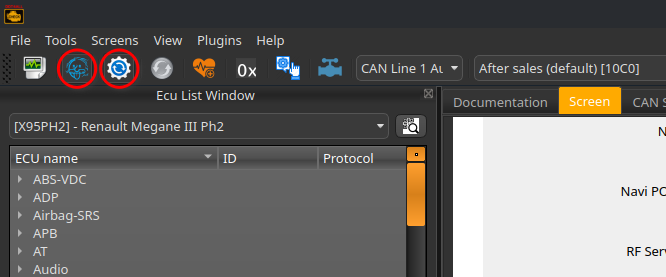
Now just copy and paste one of the modified slot 1 codes from above and paste it over the contents in “RS Configuration Slot 1” (or clear the box first) and then press “Write RS Slot1”, it will be hard to tell but the contents of the green box should also change.
At this point it should be done, I had to disconnect the battery on my car for it to appear. You may be able to just leave the car for a few hours, or try pressing the home button 5 times quickly which reboots the screen, but I didn’t try this.
Now you can access RS Drive from within RS Monitor and change settings from there.
Optional: changing slot 2
For anyone that’s interested in what slot 2 does, it basically manages the torque and power graphs in RS Monitor, changing these does not change the map on the car, its for display only; you could make it display 1000BHP if you wanted. On a standard car you don’t need to change these but on a mapped/modified one you can change this to reflect the real power of the car as I have done on my Megane RS400.
For anyone wanting to do this, here is a spreadsheet which allows you to input new figures and generates a new code for you. If you do this you also need to edit slot 1 again with the new peak power and torque figures.
Disclaimer: This guide is provided for information only, and you follow it entirely at your own risk. Writing to your car’s ECUs can cause unexpected behaviour, and I can’t be held responsible for any damage to your vehicle, loss of data or warranty, or anything else that results. These steps worked for me on my own car, but that’s no guarantee they’ll work on yours. Always back up your original slot values before changing anything, and if you’re not comfortable doing this yourself, speak to a professional.

-
Renault Megane RS 250 (R.S.400)
Modfied Renault Megane RS 250 build
-
VentPuck
A round touch-screen OBD2 gauge that sits in the air vent of my Megane RS

-
BMW Rear View Mirror LIN Decoder
A board to decode a LIN BMW rear view mirror
-
Enabling RS Drive 2 in a Megane MK3
A guide on enabling RS Drive 2 in RS Monitor on a Renault Megane MK3 with a R-Link infotainment system.
-
Retrofit Sunvisor Lights to Renault Megane MK3
A guide on retrofitting sunvisor lights to a Renault Megane MK3.
-
Retrofit Powerfold Mirrors Renault Megane MK3
A guide on retrofitting electric folding mirrors to Renault Megane MK3.
-
Update Renault Megane MK3 Radio to 2.42 (Latest/Final Update)
A guide on updating radio/headunit in a Renault Megane MK3 to 2.42 which is the latest and final update.